
AI AGENT · BACKGROUND BY DESCRIPTION · SMARTGENIUSAI
How to Change a Photo Background With an AI Prompt
A background prompt can replace the environment with a scene described in plain language while keeping the subject in place. The edit looks convincing only when the new environment agrees with the original camera angle, scale, subject edges, lighting and contact shadows.
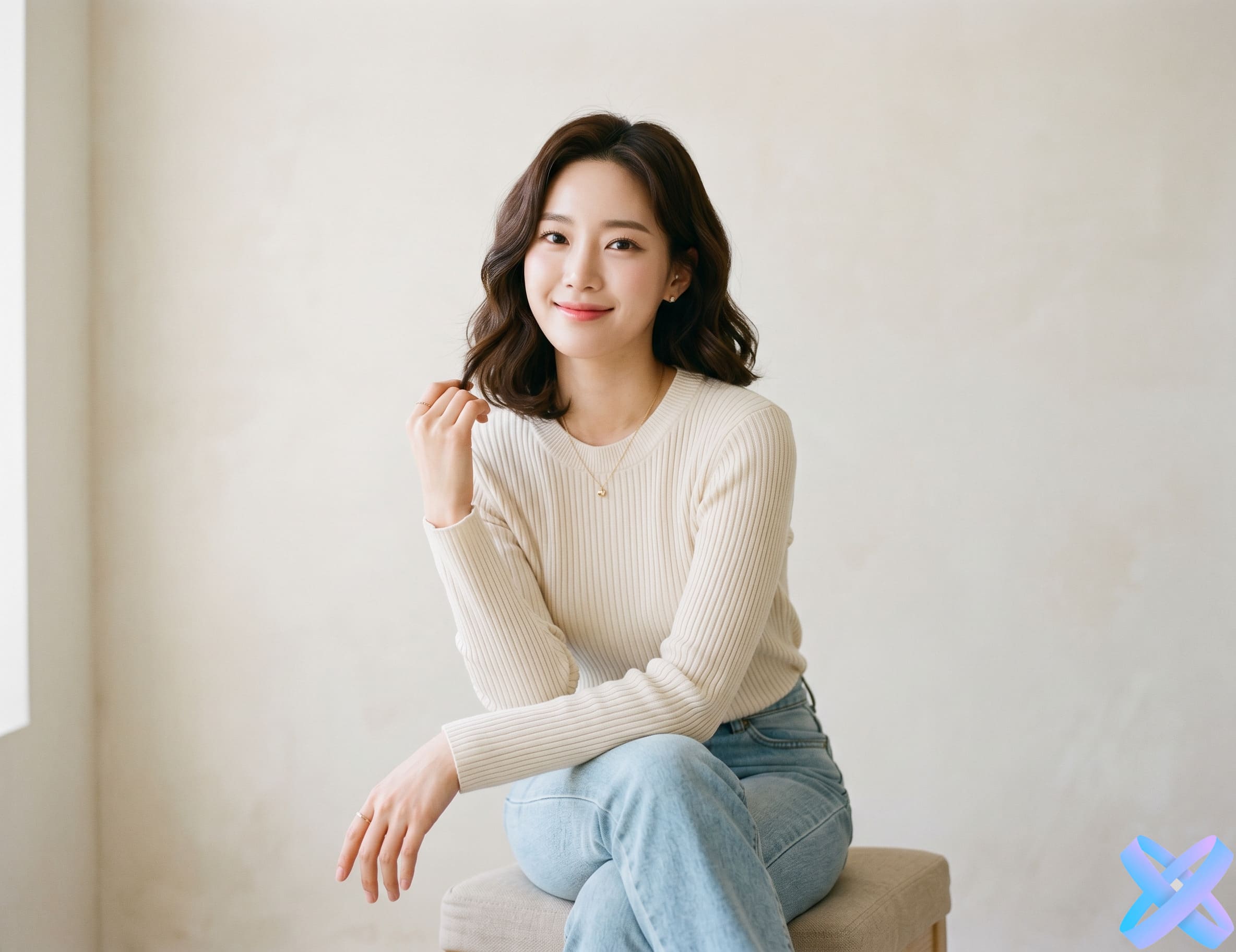
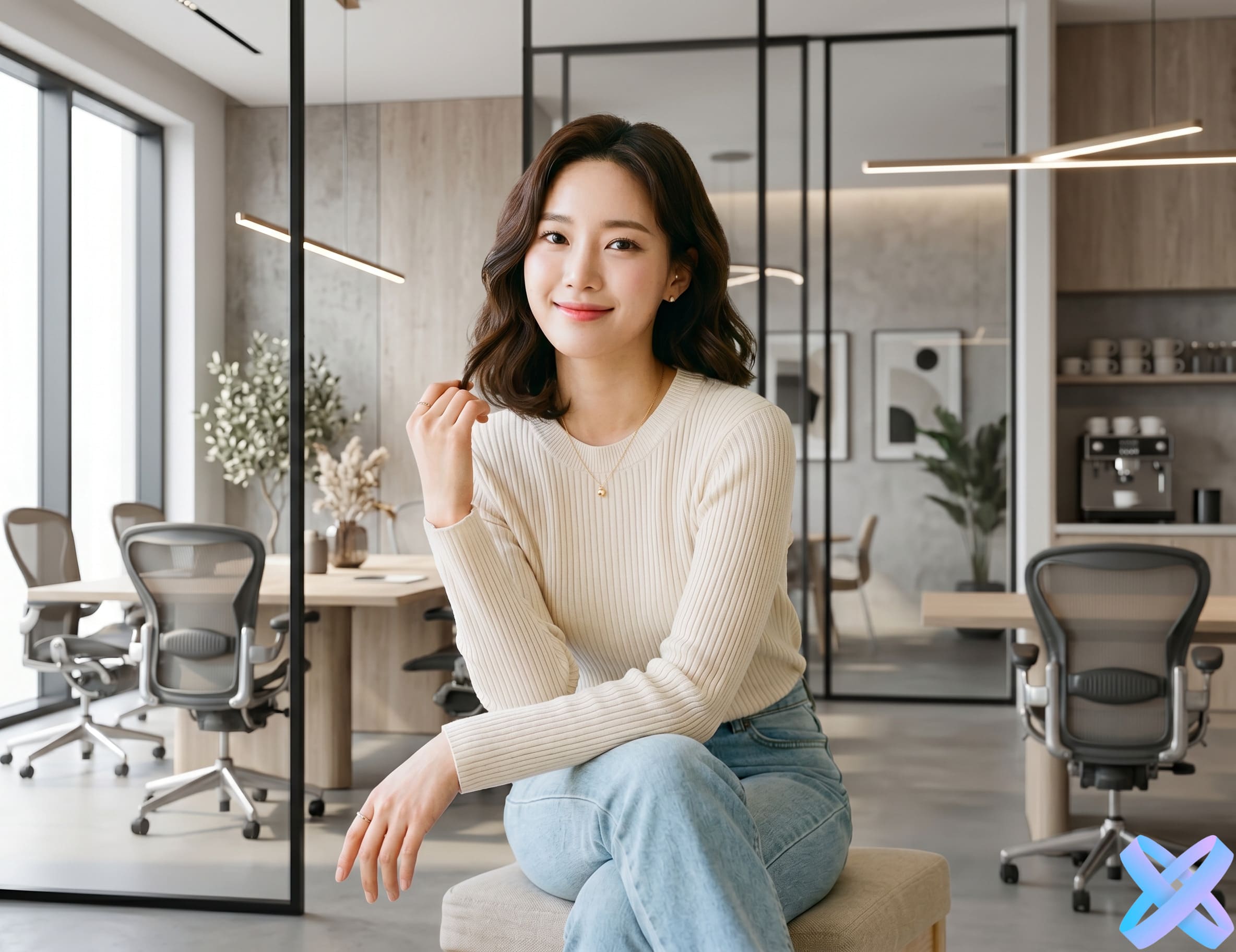
Replace or redesign the environment using text while keeping the main subject, framing and identity stable. The most reliable workflow is controlled rather than poetic. Define the change, define the constraints, and review the image in passes so one impressive area does not hide an important error elsewhere.
What change photo background with an AI prompt actually asks the model to do
A background prompt can replace the environment with a scene described in plain language while keeping the subject in place. The edit looks convincing only when the new environment agrees with the original camera angle, scale, subject edges, lighting and contact shadows.
The Agent receives both the image and the instruction. It has to identify the relevant subject, understand what should change, reconstruct affected pixels and blend the new content into the existing photo. That means prompt quality and source quality work together: a perfect sentence cannot reveal visual information that the source never contained.
The most reliable workflow is controlled rather than poetic. Define the change, define the constraints, and review the image in passes so one impressive area does not hide an important error elsewhere.
Start with a source that makes the task possible
Choose a source where the subject is clearly separated from the environment. Fine hair, transparent objects, motion blur and heavy foreground overlap can make boundaries harder to rebuild, so higher-quality sources reduce edge artifacts.
Look for sharp edges, readable facial or product detail, enough resolution and enough space around the area that will change. Heavy blur, extreme compression, blocked anatomy, tiny labels or a crop that removes necessary context increases how much the Agent must invent.
Do not choose a source only because the expression or color is attractive. Choose the version that gives the model the clearest evidence for the edit you actually want to perform.
Define the change and the preserve list separately
Protect the subject, face, clothing, pose, camera perspective and crop. If the original light is strongly directional, either choose a compatible new scene or explicitly ask the Agent to harmonize the light.
This separation matters because a generative edit does not automatically know which areas you consider finished. “Change the background” tells the model the transformation, but “keep the face, outfit, pose and camera angle unchanged” defines the boundaries.
If a result keeps changing something important, move that item into the preserve list. If a result barely changes at all, strengthen the main action instead of adding more style adjectives.
A repeatable AI Agent workflow
Define one primary objective
Write the main action first. If several edits are needed, decide which one controls the direction of the result.
Add the visual specifics
Describe the scene, garment, color, material, lighting or cleanup detail that makes the request measurable.
Protect the source anchors
List the face, product, pose, proportions, camera angle, label or environment details that must remain stable.
Generate and inspect in passes
Check the requested change first, then preservation, realism and small artifacts before continuing to another edit.
After the first result, compare it with the source and make a decision: accept, refine one instruction, or split the project into another focused stage. Controlled iteration is faster than rewriting the entire brief after every attempt.
Where this workflow is useful
- Move a portrait into a professional office or studio setting.
- Replace a messy room with a clean lifestyle scene.
- Create travel or cinematic environment variations.
- Build a custom scene that is not available as a preset background.
These scenarios work best when the source already contains something worth preserving. The Agent is not only a generator; it is most useful when it transforms a good existing image into a more useful version without discarding the original identity, product or composition.
Background prompts should describe space
Location, time of day, material, depth and light are useful scene attributes. “Warm minimalist studio with textured plaster wall and soft side light” is easier to interpret than “premium background.”
Perspective is as important as style
A beautiful scene still fails if the floor line or camera angle conflicts with the subject. Check feet, furniture, horizons and architecture before focusing on color grading.
Use the dedicated Background tool for simpler cases
If the job is only transparency, white background or a standard studio scene, the focused Background tools may be faster. Agent is most useful when the scene description is custom or combined with another edit.
Prompt structure that is easy to control
A practical prompt can be written in four parts: main action → visual specifics → preserve list → realism constraint. The exact words can stay natural. The important part is the hierarchy.
For example, instead of “make this professional,” describe what professional means visually: neutral background, controlled soft light, cleaner clothing, natural skin, same face. Instead of “make the product premium,” define surface, background, light and the exact product details that must not change.
Replace the background with a modern office with soft window daylight, keep the same person, face, clothing, pose and camera framing, and match shadows naturally.
Change the environment to a rainy neon city at night, preserve the subject exactly and adapt the scene lighting realistically without changing identity.
Replace only the background with a warm minimal studio wall and soft floor shadow; keep the product shape, color and perspective unchanged.
How much detail should an Agent prompt contain?
Use enough detail to remove ambiguity, but stop when every new phrase starts introducing another creative direction. A short precise prompt often produces a more controllable result than a paragraph that mixes mood, camera language, styling, background, anatomy and unrelated enhancement.
If the request contains several independent transformations, order them. Put the main transformation first, supporting changes second and preservation constraints last. When exactness matters, consider making the second transformation only after the first result is approved.
How to keep the result realistic
The new background should feel photographed from the same camera position. Horizon, floor, architecture, light direction and shadows should support the subject instead of making the person or object appear pasted in.
Inspect the physical relationships that the edit touches. New objects need contact shadows, backgrounds need compatible perspective, clothing must follow the body, recolored materials must retain highlights, and product scenes need correct scale. A visually attractive edit can still feel fake when one of those physical cues disagrees with the source.
Also compare global image character. If the source is softly lit and low contrast, a hyper-sharp generated element can look pasted in even when its shape is correct. The new content should inherit the camera and lighting logic of the frame.
Common mistakes with change photo background with an AI prompt
| Problem | Better approach |
|---|---|
| Choosing | Choosing a background with incompatible camera height or lens perspective. Revise the request so the Agent has one clear priority and enough source information to reconstruct the change. |
| Ignoring | Ignoring hair and edge quality around the subject. Revise the request so the Agent has one clear priority and enough source information to reconstruct the change. |
| Requesting | Requesting a dark night scene but preserving bright midday lighting on the subject. Revise the request so the Agent has one clear priority and enough source information to reconstruct the change. |
| Changing | Changing both the person and the environment when only the scene was intended. Revise the request so the Agent has one clear priority and enough source information to reconstruct the change. |
| Using | Using vague terms such as “better background” with no location or visual direction. Revise the request so the Agent has one clear priority and enough source information to reconstruct the change. |
When a generation goes wrong, identify the first broken cue instead of grading the image as “bad.” Is the wrong object edited? Did identity change? Did the model ignore the preserve list? Is perspective impossible? The next prompt should address that specific failure.
Review the result in separate passes
Do not judge everything at once. First check whether the Agent performed the requested action. Then compare preserved details. Finally inspect realism, artifacts and composition. This keeps an impressive creative change from distracting you from a small but important error.
- Face: review face or focal object against the source at full resolution before approving the edit.
- Shape: review shape and proportions against the source at full resolution before approving the edit.
- Camera: review camera viewpoint against the source at full resolution before approving the edit.
- Surface: review surface detail against the source at full resolution before approving the edit.
- Scene: review scene continuity against the source at full resolution before approving the edit.
- Highlight: review highlight and shadow logic against the source at full resolution before approving the edit.
- Whether: review whether the output still matches the brief against the source at full resolution before approving the edit.
Zoom out at the end. A result can pass every close-up test and still feel awkward as a whole because the subject no longer balances with the background, the crop is weak or the new element draws too much attention.
When to use a specialized SmartGeniusAI tool instead
If the task maps exactly to a focused workflow—such as Remove Background, Pose Changer, Hair, Emotion, Photo Enhancement or a standard Product Creative preset—the specialized tool can be faster and easier to evaluate. Agent is strongest when the request is custom, language-specific or combines related edits that would otherwise require several interfaces.
You can also combine both approaches. Use Agent to establish the custom concept, then open the result in the AI Photo Editor or a focused tool for final correction. The best workflow is the one that changes only what still needs work.
Try this workflow with SmartGeniusAI Agent
Upload a strong source, describe the main edit in plain language, protect the details that matter, compare the result with the original and continue only after the important constraints survive.
Frequently asked questions
Do I need to choose the edit type manually?
No. On the AI Agent page you describe the desired result in plain language and the Agent determines the most suitable edit direction from the prompt.
Can one prompt contain more than one action?
Yes, but combined instructions are more stable when the main action comes first and supporting changes are ordered clearly. For difficult jobs, two controlled stages can be safer than one overloaded prompt.
What should I tell the Agent to preserve?
Protect the details that define the source for this task. In this workflow, protect the subject, face, clothing, pose, camera perspective and crop. If the original light is strongly directional, either choose a compatible new scene or explicitly ask the Agent to harmonize the light.
Can I continue editing the result?
Yes. After the Agent creates the main transformation, you can continue in the SmartGeniusAI Editor or use a more focused tool for correction, background, enhancement or another specific change.
Are AI edits always exact?
No. The result is generative. Faces, products, labels, small text, materials and geometry should be checked carefully when accuracy matters.
Final takeaway
How to Change a Photo Background With an AI Prompt works best when the prompt behaves like a clear creative brief rather than a collection of adjectives. Define the action, describe the important visual details and protect the source elements that should not move.
The Agent gives you flexibility, but quality still comes from controlled decisions. Strong source information, explicit preservation, physical realism and staged iteration are what turn a text command into a useful photo edit rather than an unpredictable regeneration.