
AI EMOTION GUIDE · SMARTGENIUSAI
How to Make a Surprised Face in a Photo With AI
Surprise is one of the most visually distinctive expression edits because it can affect the eyebrows, eyelids and mouth at the same time. That also makes it easy to overdo. A convincing result should read instantly as surprised while still looking like the same adult person in the original photograph.
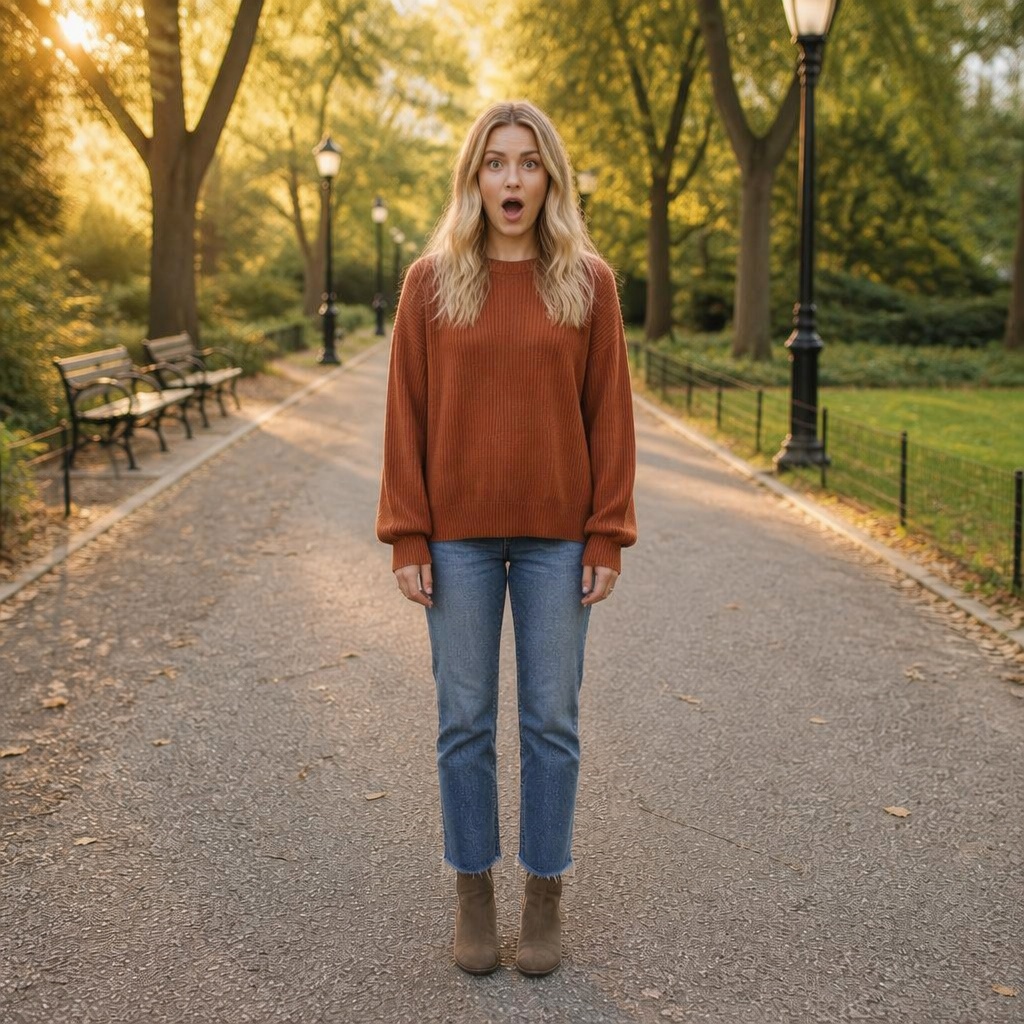

Use a clear face with visible eyebrows and mouth, choose a surprised expression, and evaluate the eyes, brow height and jaw together. If every feature is pushed to its maximum, the result will look theatrical; a moderate surprise is usually more realistic.
The three main visual cues of surprise
Raised eyebrows increase the visible forehead and open the eye area. Wider eyes expose more of the iris and sclera. The mouth may part or open depending on intensity. These cues should work together, but they do not all need to be extreme at the same time.
A subtle surprised face can have lifted brows and slightly opened eyes with a mostly closed mouth. A stronger reaction can open the jaw more. Choose the level that fits the scene rather than automatically selecting the most dramatic output.
Avoid the “cartoon surprise” problem
Generative models can exaggerate large eyes, perfectly arched brows and a round open mouth because those features communicate surprise very clearly. The result may be semantically correct but photographically implausible.
Compare against the source face. If the eye size or jaw opening no longer seems anatomically consistent with the person, regenerate or choose a less intense result. Real surprise is expressive, but it still follows the person’s facial proportions.
Why visible eyebrows matter
Brows carry a large part of the surprise signal. Heavy bangs, hats or shadows can hide them and force the model to infer their position. The edit may still work, but you have less visual information for judging whether the result is consistent with the person.
For examples and before/after assets, use portraits where the brow line is readable. This makes the transformation clearer and reduces the temptation to overcompensate with the mouth.
Creative uses for a surprised expression
Surprised faces work well in reaction images, thumbnails, playful social posts, character concepts and storytelling sequences. They can also turn a technically good but emotionally flat portrait into a more dynamic visual when the context supports that reaction.
For professional portraits, surprise is usually not the intended final expression. In that context it is better treated as a creative alternative rather than a replacement for neutral, smile or confident directions.
Choose a source that makes expression cues easy to read
For a surprised-expression edit, the editor has to understand the original face before it can rebuild a new emotional state. Sharp eyes, a visible brow line and a clearly defined mouth reduce ambiguity. For a surprised-expression edit, heavy smoothing, beauty filters and compression can remove exactly the subtle details that make identity and expression believable.
In this a surprised-expression edit workflow, a slight head turn is fine if the important features remain visible. For a surprised-expression edit, extreme profile views, closed eyes or large foreground objects increase the amount of information the model must infer, which usually increases variation between generations.
| Source-photo trait | Why it matters | What to avoid |
|---|---|---|
| Face detail for a surprised-expression edit | Lets the model preserve identity while rebuilding expression cues for this task | Tiny faces, blur and aggressive compression |
| Visible eyes and brows | Upper-face cues carry a large part of emotion | Sunglasses, deep shadow and heavy occlusion |
| Readable mouth | Important for smile, serious and surprise edits | Hands, microphones or hair covering the lips |
| Stable lighting | Makes before/after comparison fair | Mixed colored light or crushed shadows |
| Useful context | Helps you judge whether the emotion fits the scene | Overly tight crops with no posture context |
A controlled workflow for a surprised-expression edit
Use one strong source
Choose the clearest portrait and keep it unchanged while testing a surprised-expression edit.
Pick one emotional direction
For a surprised-expression edit, test one preset or intensity at a time so the cause of each visual difference stays clear.
Generate more than one candidate
Because a surprised-expression edit can vary between generations, compare two or three candidates before choosing one.
For a surprised-expression edit, open the SmartGeniusAI emotion tool, upload the source portrait, choose the relevant expression direction and compare the output with the original. While evaluating a surprised-expression edit, keep pose, hairstyle and background edits separate so the expression remains the only major variable.
Read five facial zones together for a surprised-expression edit
In a surprised-expression edit, emotion is distributed across the face rather than isolated in the mouth. For a surprised-expression edit, scan from brows to jaw and compare how each region supports the intended result; this often explains why an output that looks almost right still feels artificial.
- Eyebrows: check height, inner-brow tension and whether the new shape still follows the person’s anatomy.
- Eyes: compare openness, lower-eyelid movement and whether both eyes respond consistently.
- Cheeks: smile and happiness often lift them; surprise and seriousness may change them less.
- Mouth: inspect corner direction, lip thickness, jaw opening and tooth generation when relevant.
- Jaw and face outline: during a surprised-expression edit, soft tissue can move, but the underlying head shape should still identify the same person.
Use a two-pass quality check
When reviewing a surprised-expression edit, on the first pass, ignore small rendering defects and judge identity, mood and scene fit. For a surprised-expression edit, on the second pass, zoom in to inspect eyelids, pupils, lip edges, teeth and skin transitions. For a surprised-expression edit, a result should pass both tests; technical sharpness cannot rescue an expression that feels emotionally wrong.
For a second check of a surprised-expression edit, reopen the image after a short break when the edit matters. For a surprised-expression edit, after staring at one generation for too long, people adapt to distortions that become obvious again with fresh eyes.
Useful scenarios for a surprised-expression edit
The right intensity for a surprised-expression edit depends on where the finished portrait will appear. For a surprised-expression edit, decide the use case first, then choose an expression level that fits that audience rather than simply selecting the most dramatic output.
- Reaction-style images
- Video or article thumbnails
- Playful social posts
- Character and storytelling concepts
- Creative before-and-after demonstrations
Common mistakes in a surprised-expression edit
For a surprised-expression edit, use the following problems as rejection criteria rather than defects you have to accept just because the rest of the image looks polished:
- Eyes enlarged beyond the person’s anatomy
- Brows raised into a perfectly artificial arch
- A circular mouth that looks pasted on
- Jaw shape changing too much
- Using extreme surprise in a scene that has no visual reason for it
If the same problem keeps appearing during a surprised-expression edit, change the source image or reduce the amount of facial reconstruction. For a surprised-expression edit, a stronger input or subtler target is usually more useful than repeatedly rescuing an inconsistent generation.
When should you regenerate a surprised-expression edit?
Regenerate a a surprised-expression edit result when identity changes, when one facial zone communicates the target emotion but another contradicts it, or when teeth, eyelids or lip boundaries are visibly broken. Natural asymmetry alone is not a reason to reject the image.
If several a surprised-expression edit attempts fail in the same way, treat that pattern as feedback about the source or requested intensity. For a surprised-expression edit, a clearer portrait or smaller emotional shift is more informative than producing dozens of near-identical attempts.
Try this expression workflow on your own portrait
Use the focused SmartGeniusAI workflow to compare the source and edited expression while keeping the rest of the image stable while testing a surprised-expression edit.
Keep a surprised-expression edit separate from other edits
During a surprised-expression edit, changing pose, hairstyle, makeup and lighting at the same time makes the result harder to judge. For a surprised-expression edit, isolate the facial-expression step first, then use another dedicated tool only after you have chosen a strong expression result.
This modular workflow makes before-and-after examples for a surprised-expression edit easier to trust because readers can see which change actually came from the Emotion tool.
Keep synthetic emotion separate from factual claims
For a surprised-expression edit, changing a person’s expression can change the perceived meaning of a photograph. For a surprised-expression edit, use images you are authorized to edit, and do not use a generated expression to falsely imply that someone reacted a certain way to an event, person or statement.
When sharing a a surprised-expression edit result, the safest uses are personal presentation, creative concepts and transparent image editing where viewers are not being asked to treat the altered emotion as documentary evidence.
Frequently asked questions
Does SmartGeniusAI have a Surprised Face page?
Yes. There is a focused Surprised Face workflow inside the Emotion cluster.
Should the mouth always be open?
No. Mild surprise can read through the brows and eyes with only a slightly parted mouth.
Why do surprised edits sometimes look cartoonish?
Because exaggerating eyes, brows and mouth makes the emotion obvious. Choose a more moderate generation when realism matters.
Can I use a side-angle portrait?
Slight angles can work, but both eyes and the brow area should remain readable for easier evaluation.
Is surprise suitable for thumbnails?
Yes. Its clear facial cues can read well at small sizes, provided the expression is not distorted.
Final takeaway
For a surprised-expression edit, prioritize a clear source, recognizable identity and facial cues that agree with one another. For a surprised-expression edit, review the whole face before tiny details and choose the most believable intensity, not automatically the strongest one. For a surprised-expression edit, a successful result should still feel like the same person in the same photograph, only with the intended expression changed.