
AI AGE PROGRESSION · SMARTGENIUSAI
How Would I Look Older? See Your Future Self With AI
Wondering how you might look older is less about predicting one exact future face and more about exploring a plausible visual direction. An AI age changer can add age-related cues while trying to preserve identity, expression, pose, hair, clothing and the surrounding scene. The most useful result is one that still looks unmistakably like the same person rather than a generic “old age” filter.
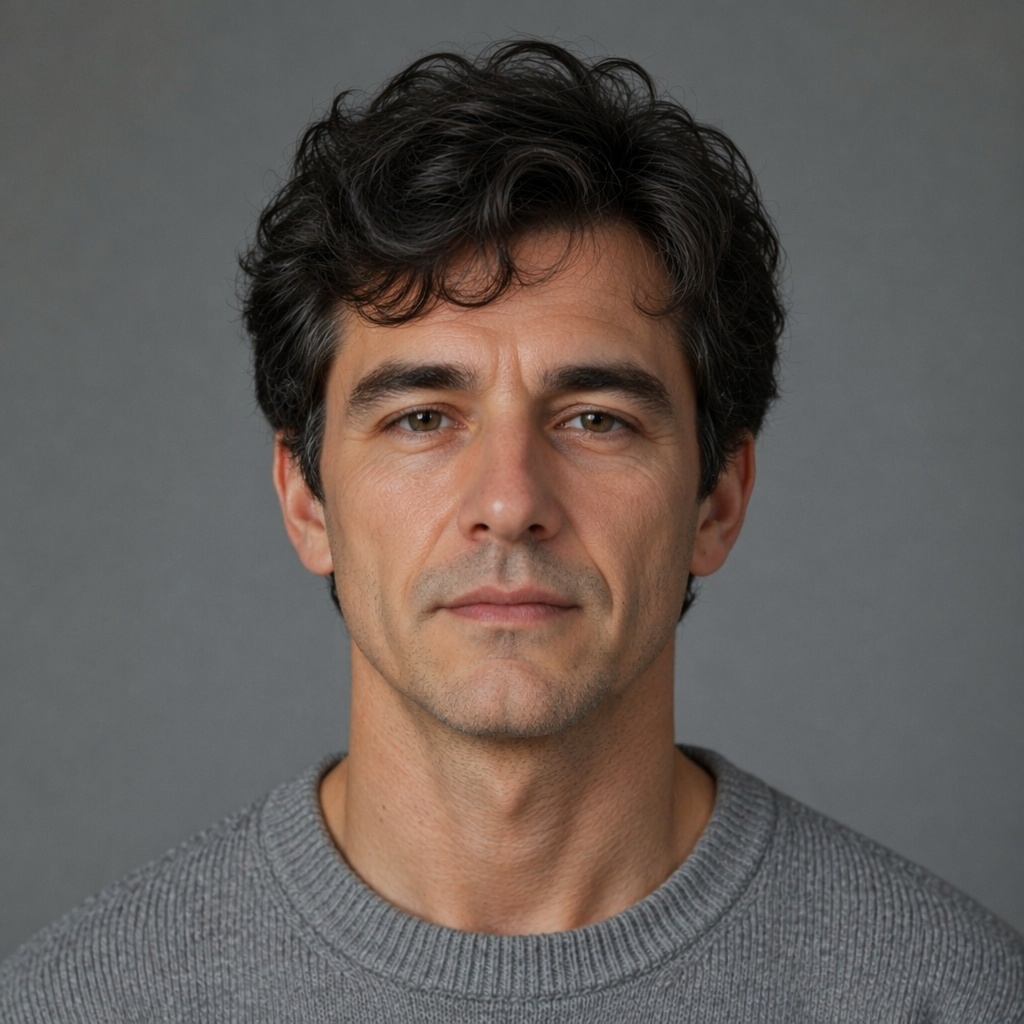
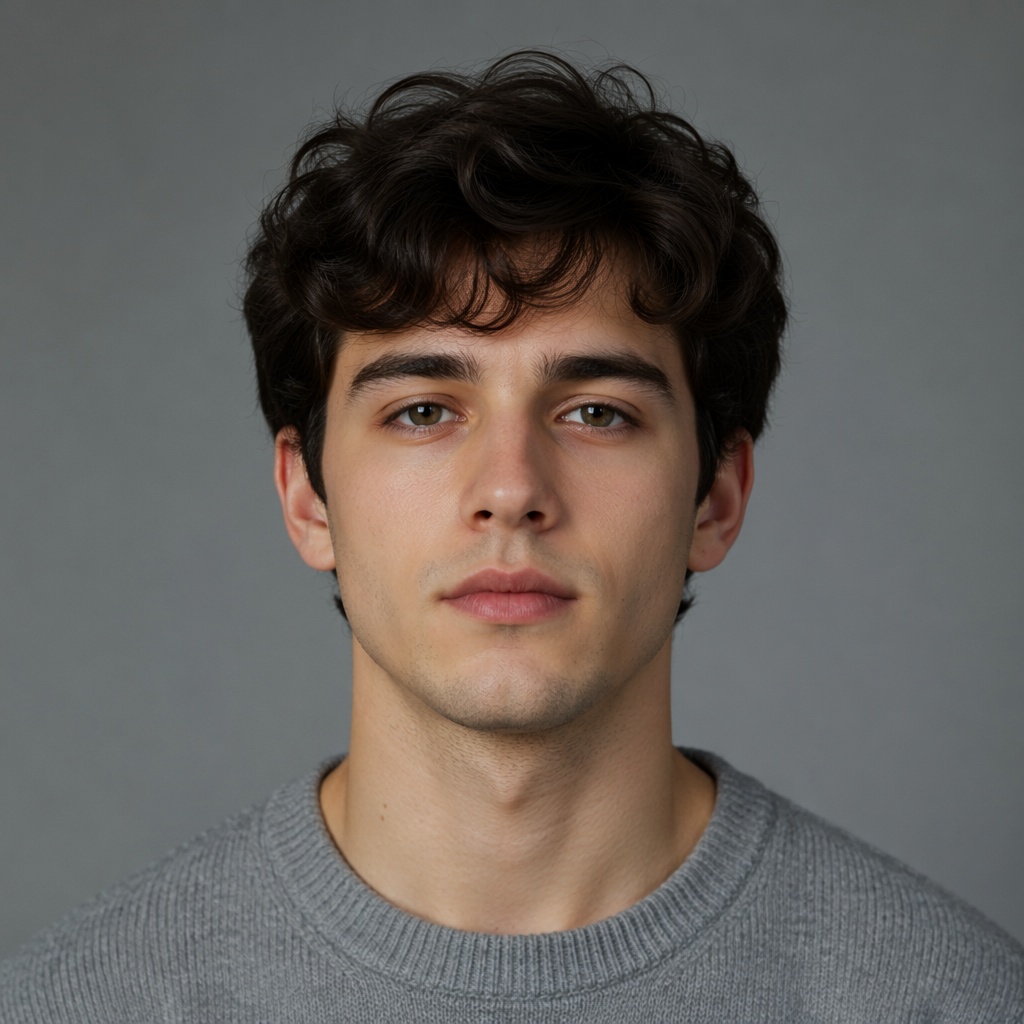
AI age progression is a visual simulation, not a medical or biometric prediction. Genetics, sun exposure, health, lifestyle, grooming and many other factors influence real aging, so treat the output as a creative preview rather than a forecast.
What “looking older” means in an AI portrait
A convincing older portrait is not created by drawing wrinkles everywhere. Age perception comes from a combination of subtle signals: skin texture, under-eye depth, facial volume, jaw definition, hair color, hair density and the way those cues interact with the original lighting. If every cue is pushed equally hard, the result quickly becomes theatrical.
A better age edit keeps the face recognizable. The distance between the eyes, nose shape, mouth, characteristic asymmetries and overall expression should remain consistent. Aging should feel like a transformation of the existing person, not a replacement with someone who merely has similar features.
Start with a portrait that gives the AI useful information
Choose an image where the face is large enough to inspect, in focus and not heavily covered by hair, hands, sunglasses or extreme shadow. Neutral or soft lighting is especially useful because the model can distinguish actual facial structure from temporary contrast created by harsh light.
A front-facing or moderate three-quarter portrait is usually easier to evaluate than a strong profile. You can still test other angles, but use the clearest portrait first so you have a reliable baseline for comparison.
Choose the strength of aging based on the question you are asking
There is a difference between “what might I look like a little older?” and “show me an elderly version of this portrait.” A modest age step should preserve more of the current skin and hair, while a stronger step can introduce more pronounced texture, gray hair and changes in facial volume.
Do not judge every strength by the same standard. A subtle preview should look believable at normal viewing size. A dramatic elderly concept can be more expressive, but it should still retain the person’s core facial geometry and not turn into a caricature.
| Goal | What to prioritize | What to avoid |
|---|---|---|
| Slightly older | Small texture and maturity cues | Deep wrinkles or sudden hair transformation |
| Mature | Balanced skin, volume and hair changes | Changing identity or expression |
| Elderly concept | Stronger but coherent age cues | Exaggerated costume-like aging |
Compare the result in layers instead of asking only “does it look old?”
First check identity. Then check the age cues. Finally check scene preservation. This order matters because a result can look convincingly older yet still fail if the person no longer resembles the source.
Zoom out after inspecting details. The face should sit naturally in the original photograph. Skin contrast, color temperature and sharpness need to belong to the same camera and lighting environment as the neck, hair and background.
Skin texture should change without becoming a texture overlay
Realistic aging is uneven. Fine lines may appear around the eyes and mouth, but the entire face should not receive the same repetitive pattern. Forehead texture, cheeks and under-eye areas age differently, and the model should respect existing light and skin tone.
Watch for repeated wrinkle motifs, over-sharpened pores or dark creases that look painted on top. These are signs that the effect is being applied as a style rather than integrated into the portrait.
Hair can influence age perception as much as wrinkles
Gray or white hair is a strong age cue, which is why an AI result may feel dramatically older even when facial changes are moderate. But not everyone goes gray at the same rate, and hairline changes are highly individual.
If the hair transformation overwhelms the face, compare another aging strength or keep hair changes more conservative. The goal is to explore plausible appearance directions, not to imply that one specific hair outcome is inevitable.
Preview an older version of your portrait
Upload a clear adult portrait and try the Make Me Older direction in SmartGeniusAI. Compare the before-and-after result while keeping identity and the original scene as your reference.
Why an older AI portrait cannot tell you exactly how you will age
Future appearance is influenced by biology and environment in ways a single photograph cannot measure. Family traits, sleep, stress, sun exposure, smoking, skincare, health conditions, weight changes, dental changes, hairstyle and many other factors can alter how a face develops over time.
The model is therefore showing a visually coherent possibility based on patterns it has learned, not calculating your personal future. That distinction makes the tool more useful: you can enjoy the concept without mistaking it for a diagnostic or predictive system.
Use multiple source photos if you want a more balanced impression
A single selfie may contain temporary shadows, a particular expression or lens distortion. If you are curious rather than creating one final image, run the same age direction on two or three different good portraits and compare what stays consistent.
Repeated features can help you separate stable identity cues from quirks of one photograph. If every result changes the person differently, the sources may be too varied or the requested age jump may be too aggressive.
Good uses for future-self images
Age-progressed portraits work well for creative timelines, character concepts, “years later” storytelling, family conversation prompts, profile experiments and visual planning for fictional projects. They can also be useful when you simply want to compare subtle versus strong aging on the same image.
Avoid using an age simulation as evidence about health, lifespan or what a person “will” look like. It is a visual editing result, not a clinical assessment.
A simple review checklist before you keep the result
- The eyes, nose, mouth and overall face shape still identify the same person.
- Age cues look integrated into the original lighting instead of painted on.
- Hair changes support the concept without dominating it.
- The neck and face do not appear to belong to different age groups.
- Background, clothing, pose and expression remain consistent with the source.
- The result looks plausible both zoomed in and at normal viewing size.
How to evaluate the result after a short break
For “how would I look older,” age edits are surprisingly easy to over-accept after staring at them for several minutes. Save the candidate, look at another image, then return to the source and result side by side. Fresh eyes make identity drift, overly smooth skin and scene mismatch easier to notice.
For “how would I look older,” also test the image at thumbnail size. For “how would I look older,” if the person feels different before you can even see wrinkles or skin texture, the transformation probably changed global facial proportions rather than age cues alone.
Why a second source photo can be informative
After you get a convincing “how would I look older” result, repeat the same age direction on another clear portrait of the same adult person. In a “how would I look older” test, the two outputs should not be identical because lighting and expression differ, but the core identity should remain consistent.
That second “how would I look older” comparison is useful for long-form examples because it shows whether the workflow depends on one unusually convenient source image or works across more than one portrait.
Keep age editing separate from general enhancement
For “how would I look older,” upscaling, sharpening, skin cleanup and color correction can all change perceived age even without an age model. During the “how would I look older” test, avoid applying those changes at the same time or you will not know which tool produced the visual difference.
For “how would I look older,” generate the age direction first from a good source. After you select the strongest identity-preserving version, use enhancement only when the final image genuinely needs it.
When to regenerate instead of trying to “fix” the result
If identity changed substantially, the skin looks synthetic or the face no longer matches the neck and hair, start again with a better source or a different age strength. Small color or crop issues can be edited later, but a broken identity transformation is easier to regenerate than to repair manually.
Treat generation as a comparison process. One result can be useful, but two or three controlled attempts often make it much easier to identify the most natural version.
Frequently asked questions
Can AI show exactly what I will look like when I am older?
No. It can generate a plausible visual simulation, but real aging depends on many biological and environmental factors that cannot be predicted from one photo.
Does the tool change only wrinkles?
A realistic age edit may also affect skin texture, under-eye depth, facial volume and hair cues while trying to preserve identity and the scene.
What type of photo works best?
A sharp adult portrait with a clearly visible face, moderate angle and natural lighting is the easiest starting point.
Should I use a smiling or neutral photo?
Either can work, but a relaxed expression often makes it easier to compare structural changes without smile lines dominating the result.
Can I compare several aging strengths?
Yes. Comparing subtle and stronger age directions is often more informative than treating one output as the only possible future appearance.
Final takeaway
Use AI aging as a realistic-looking visual experiment, not a prediction. Start with a clear portrait, compare age strength carefully, protect identity first, review skin, hair and scene integration, and remember that real future appearance is shaped by many factors no image model can know.